
Turn Photos into Pixel Art with AI: 8-Bit Transformations
Remember the magic of classic 8-bit video games? The simple, blocky characters and vibrant worlds sparked our imaginations. Each pixel was placed with purpose, creating iconic visuals that are still loved today. What if you could step into that retro world by transforming your own photos into captivating pixel art?
Thanks to modern technology, you no longer need to be a digital artist to create stunning 8-bit masterpieces. AI-powered tools can now instantly convert any picture into pixel art, blending modern convenience with nostalgic charm. This guide will show you how to easily turn your photos into pixel art, explore the creative possibilities, and get started for free. With a powerful AI tool like the one on our homepage, you can start creating in just a few clicks.
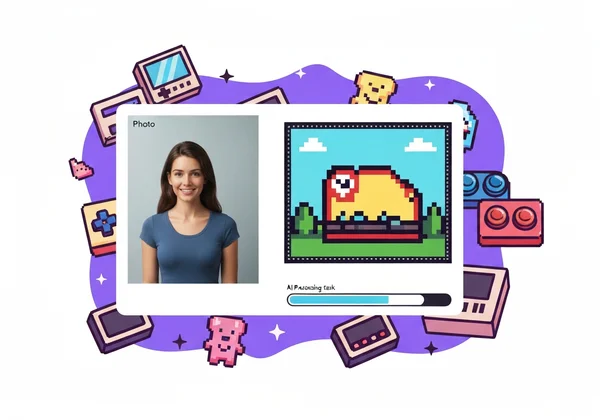
How to Turn Your Photos into Pixel Art Online for Free
Creating your own pixel art is easier and faster than ever before. You don't need to download complex software or have any design skills. An online AI pixel art generator does all the heavy lifting for you, delivering a fun and creative experience that gets you results in seconds.
Step-by-Step Guide to Using Our AI Pixel Art Generator
We’ve designed our tool to be incredibly intuitive. The process is straightforward, allowing you to focus on creativity, not complicated controls. Here’s how simple it is to convert your photo to pixel art:
- Upload Your Photo: Start by visiting our homepage. You’ll see an option to upload an image directly from your computer or mobile device. Just drag and drop your file or click to select it. The tool supports common formats like JPEG, PNG, and WEBP.
- Choose the Pixel Art Style: Once your image is uploaded, browse through the available art styles. Select the "Pixel Art" effect from the library. Our AI is specifically trained to recognize the key elements of your photo and translate them into this unique aesthetic.
- Generate and Download: With your style selected, the AI gets to work. In just a moment, it will process your image and generate a pixelated version. You can preview the result and, if you love it, download your new 8-bit creation directly to your device. It’s that simple to make pixel art from any photo.
Choosing the Perfect Photo for Your 8-Bit Transformation
While our AI is powerful, starting with the right photo can make a huge difference in the final result. To get the best 8-bit transformation, keep these simple tips in mind:
- Go for High Contrast: Photos with a clear difference between the subject and the background work best. The strong lines help the AI define the shapes in the pixelated version.
- Simple is Better: A photo with a clean, uncluttered background allows the main subject to stand out. Portraits, pet photos, or pictures of a single object often produce the most striking results.
- Clear Subjects: Ensure the main subject of your photo is in focus and well-defined. A blurry or distant subject might lose important details during the conversion process.
Understanding Pixel Art: From Retro Gaming to AI Creation
Pixel art is more than just a visual effect; it's a digital art form with a rich history. Understanding its roots helps appreciate what makes it so special and how AI is revolutionizing its creation.
A Brief History of Pixelated Aesthetics
The pixel art style was born out of necessity. In the 1970s and 80s, early computers and video game consoles had very limited graphical capabilities. Developers had to create entire worlds with low resolutions and a restricted color palette.
Developers crafted every character—like Super Mario or Pac-Man—one pixel at a time. Those limits sparked incredible creativity. The result? A charming, readable style that's still loved today. This "8-bit" or "16-bit" aesthetic defined a generation of gaming and has since become a beloved retro style celebrated by artists and fans worldwide.
The AI Magic Behind Your Photo to Pixel Art Conversion
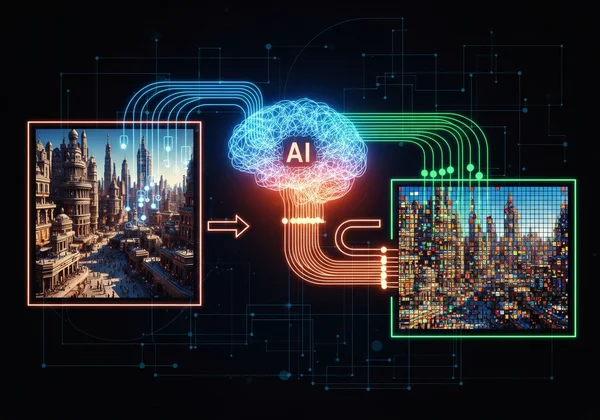
So, how does an AI turn a detailed photograph into a simplified grid of colored squares? Think of the AI as a highly skilled digital artist. When you upload a photo, the algorithm analyzes it to understand its core components: shapes, colors, light, and shadows.
No need to place pixels by hand. The AI simplifies colors into a retro palette. It turns details into bold, blocky shapes. The result is an image that captures the essence of your original photo while faithfully recreating the retro pixel art style. This advanced process allows our online pixel art converter to produce high-quality results in seconds.
Tips for Creating the Best AI Pixel Art from Photos
Once you've mastered the basics, you can start experimenting to create truly unique and impressive pixel art. A little bit of preparation and a willingness to play can elevate your creations from good to great.
Enhancing Detail and Color in Your Pixelated Images
The quality of your source photo directly impacts the final artwork. Before uploading, consider making a few minor adjustments to your picture. Increasing the saturation can make the colors in your pixel art more vibrant and pop, just like in classic arcade games.
Sharpen your image a bit first. It helps the AI spot edges clearly. You'll get a sharper, cleaner result. Don't be afraid to try the same photo with and without these edits to see which version you prefer.
Experimenting with Different Pixelation Styles and Sizes
The beauty of an AI tool is the freedom to experiment without risk. Don't stop at just one photo! Test out different types of images to see how the pixel art effect transforms them.
- Portraits: Turn yourself and your friends into video game characters.
- Landscapes: Convert a beautiful sunset or mountain view into a retro game background.
- Pets: See what your furry friend looks like as an adorable 8-bit creature.
- Objects: Transform everyday items like your car or favorite food into pixelated icons.
Each photo will yield a unique result, and you might be surprised by what works best. The more you experiment, the better you'll get at predicting which images will produce the most amazing art.
Creative Ways to Use Your AI-Transformed Pixel Art
Now that you have a collection of awesome pixel art images, what can you do with them? The possibilities are endless. This fun, retro style is perfect for adding a touch of personality to your digital life and creative projects.
Unique Social Media Content and Profile Pictures
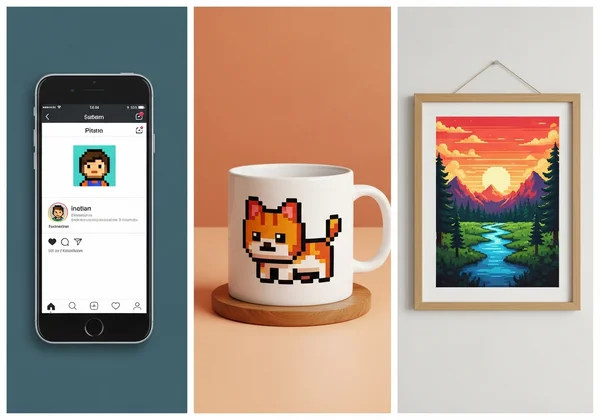
Tired of the same old selfies? A pixelated avatar is a fantastic way to stand out on social media platforms like Discord, Twitter, Instagram, or gaming forums. It shows off your creative side and a love for retro culture.
You can also use the AI pixel art generator to create unique content for your posts. A pixelated version of a travel photo or a product image can stop scrollers in their tracks and make your feed more memorable and engaging.
Personalized Gifts and Digital Art Projects
Your AI-generated pixel art isn't just for screens. It can be used to create amazing physical gifts for friends and family. Imagine a coffee mug with a pixelated portrait of a loved one or a t-shirt featuring your pet as an 8-bit hero. I've turned my dog's photo into an 8-bit hero, and it was hilarious! You could also make a framed print of a family photo transformed into retro art.
These creations make for thoughtful and unique presents for birthdays, holidays, or any special occasion. They are personal, creative, and show that you put extra thought into your gift.
Unlock Your Inner Digital Artist: Start Pixelating Today!
From the nostalgic days of arcade games to the cutting edge of artificial intelligence, pixel art continues to capture our hearts. It proves that simplicity and creativity can create something truly timeless.
You now have the knowledge and tools to dive into this wonderful art form. You can transform cherished memories, create standout social media profiles, or design one-of-a-kind gifts in just a few clicks. The best part is that you can start right now, for free.
Ready to see your world in 8-bit? Head over to our homepage and transform your photo into pixel art today!
FAQ Section
How do I turn a photo into pixel art online for free?
Turning a photo into pixel art online for free is very simple. Use an AI-powered tool like ours. Just upload your picture, select the "Pixel Art" style from the options, and the AI will automatically generate the image for you to download. The process takes only a few seconds.
What kind of photos work best for AI pixel art transformation?
Photos with clear subjects and high contrast between the subject and the background tend to produce the best results. A simple, uncluttered background helps the AI focus on the main elements of your photo, creating a cleaner and more recognizable 8-bit version.
Is this tool truly free for pixel art conversions?
Yes, you can use our platform to try out core features for free. Our tool offers a free trial that allows you to upload your photos and convert them into various art styles, including pixel art. This lets you experience the magic of the tool without any commitment. You can try it for free on our homepage.
Can I use pixel art generated from photos for commercial purposes?
The usage rights for AI-generated art can depend on the platform's terms of service and the copyright of the original photo. For personal projects, like social media avatars or gifts for friends, you are generally free to use your creations. For commercial use, we recommend reviewing our site's terms and conditions to ensure you are in compliance.