
Landscape Photos to AI Paintings: Transform Nature into Art
Have you ever stood before a breathtaking landscape—a fiery sunset, a misty mountain, or a tranquil coastline—and wished you could capture more than just a photograph? You're not alone. Many nature lovers and photographers dream of turning these powerful moments into timeless pieces of art, like a painting that hangs on a wall. But what if you don't have the skills or time to learn painting?
Thanks to amazing new technology, this is no longer a barrier. AI painting generators have arrived, making it possible for anyone to transform their favorite landscape photos into stunning works of art. This article will guide you through the process, from taking the perfect shot to choosing the right artistic style. We'll show you how to easily convert scenery into artwork with just a few clicks.
With our advanced AI, you can bring your artistic vision to life instantly. The entire process is simple, fast, and incredibly fun. Ready to see your nature photos in a new light? You can try our free tool and start creating your first masterpiece today.
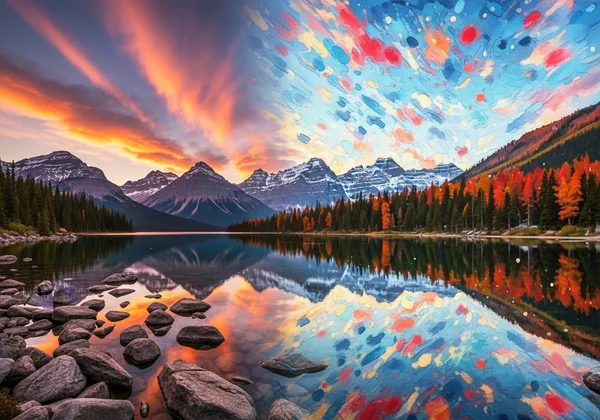
Mastering Composition for AI Landscape Painting
Before you even think about AI, a great painting starts with a great photograph. The way you frame your shot, known as composition, plays a huge role in the final artistic result. A well-composed photo provides the AI with a strong foundation to build upon, leading to a more balanced and visually pleasing painting. Here are a few key principles to keep in mind.
The Rule of Thirds in Nature Photography
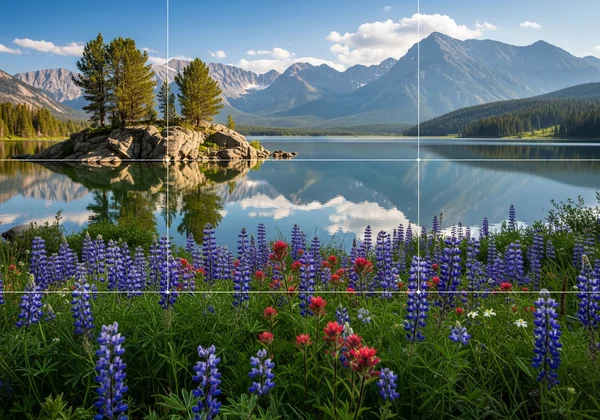
Imagine your camera's screen is divided into a 3x3 grid, like a tic-tac-toe board. The Rule of Thirds suggests placing the most important elements of your photo along these lines or at their intersections. For landscapes, this means you should avoid placing the horizon line directly in the middle of the frame.
Instead, position the horizon on either the top or bottom third line. If the sky is dramatic and full of interesting clouds, place the horizon on the bottom line to give the sky two-thirds of the frame. If the foreground has beautiful flowers or a winding river, place the horizon on the top line to emphasize the land. This simple technique creates a more dynamic and engaging image for the AI to interpret.
Creating Depth with Foreground, Midground, and Background
A flat landscape photo can result in a flat-looking painting. To create a sense of depth and draw the viewer in, try to include elements in the foreground, midground, and background. The foreground could be a patch of wildflowers, a weathered rock, or the edge of a stream. This element acts as an entry point for the viewer's eye.
The midground is typically where your main subject lies, such as a mountain range or a cluster of trees. The background, often the sky or distant hills, completes the scene. This layering technique gives your photo a three-dimensional feel, which the AI can translate into a rich and immersive painting with a clear sense of space and distance.
Lighting Conditions That Translate Best to Paintings
Lighting is the soul of any photograph, and it's especially critical for creating artistic effects. Certain lighting conditions are particularly effective for AI painting conversion. The "golden hours"—the first hour after sunrise and the last hour before sunset—are ideal. The soft, warm, and directional light during these times creates long shadows and beautiful color gradients that translate wonderfully into oil or impressionist styles.
Overcast days are also surprisingly good. The diffused, even light reduces harsh shadows and allows the rich, saturated colors of the landscape to stand out. This is perfect for achieving serene watercolor effects. Try to avoid the harsh, direct sunlight of midday, as it can create unflattering shadows and wash out colors, making it harder for the AI to produce a nuanced result.
Choosing the Perfect Art Style for Your Landscape
Once you have a beautifully composed landscape photo, the next exciting step is selecting an art style. Different styles can evoke completely different moods and emotions from the same image. The key is to match the style to the feeling of your landscape. Our AI painting generator offers a wide variety of styles, allowing you to experiment freely.
Oil Painting Style for Dramatic Mountain Vistas
Do you have a photo of a majestic mountain range with sharp peaks and dramatic clouds? The oil painting style is a perfect match. This style is known for its rich textures, deep colors, and visible brushstrokes. It can enhance the ruggedness of the rock faces and the dramatic movement of the sky.
When you convert a mountain photo to an oil painting, the AI simulates thick layers of paint, giving the image a sense of weight and permanence. The result is a powerful and classic piece of art that feels like it belongs in a gallery. This style is excellent for capturing the raw, untamed power of nature.
Watercolor Effects for Serene Lakes and Rivers
For photos of calm lakes, meandering rivers, or misty coastlines, the watercolor style is an ideal choice. Watercolors are known for their soft, transparent, and fluid appearance. This effect can beautifully capture the reflective qualities of water and the delicate atmosphere of a peaceful scene.
An AI watercolor conversion will blend colors softly, creating a light and airy feel. It’s perfect for images where you want to evoke a sense of tranquility, dreaminess, or nostalgia. The gentle gradients and subtle washes of color can turn a simple lakeside photo into a delicate and elegant work of art.
Impressionist Styles for Capturing Forest Light
Forest scenes, with sunlight filtering through the leaves, are a perfect candidate for an Impressionist style. Artists like Monet and Renoir were masters at capturing the fleeting effects of light and color. Our AI can replicate their signature short, broken brushstrokes and vibrant palettes.
Applying an Impressionist style to a forest photo will transform it into a lively scene bursting with color and movement. The AI will focus on the overall impression of light and shadow rather than on fine details, creating a beautiful, shimmering effect. This is a wonderful way to capture the magical, ever-changing quality of light in a woodland setting.
Case Studies: Transforming Real Photos into Art
Seeing is believing. To show you the true potential of AI, let's look at a few real-world examples of landscape photos transformed into beautiful paintings. These case studies demonstrate how different styles can completely change the mood and impact of an image. You can achieve similar results with your own photos when you start creating.
From Mountain Snapshot to Oil Masterpiece
Imagine a standard vacation photo of a mountain. The lighting is decent, and the composition is okay, but it lacks artistic flair. By uploading this image and selecting the "Oil Painting" style, the AI gets to work. It deepens the blues in the sky, adds textured, impasto-like strokes to the rocky cliffs, and enriches the greens of the trees below.
The final result is no longer just a snapshot; it's a dramatic and powerful masterpiece. The digital brushstrokes give it a tangible quality, turning a simple memory into a piece of art that conveys the mountain's immense scale and rugged beauty.
Ocean Waves Recreated in Watercolor Style
A photo of ocean waves crashing on the shore can be beautiful but also very common. Applying a "Watercolor" effect can give it a unique and artistic twist. The AI interprets the white foam of the waves as soft, blended highlights and renders the deep blue of the water with transparent layers of color.
The sharp details of the original photo are softened, creating a more fluid and dreamlike scene. The resulting image captures the essence and movement of the ocean in a serene, artistic way. It’s perfect for creating a calming piece of decor for a beach house or any space needing a touch of coastal tranquility.
Forest Scenes with Impressionist Brushstrokes
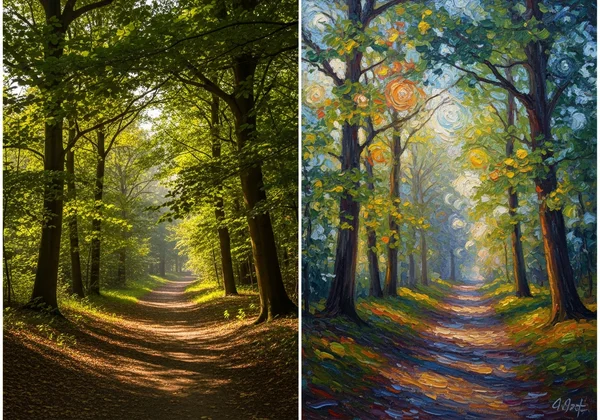
Let's take a photo of a sun-dappled forest path. It’s a pleasant image, but an Impressionist filter can elevate it into something truly special. Choosing a style inspired by masters like Van Gogh or Monet, the AI breaks down the image into small, vibrant dabs of color.
The sunlight filtering through the canopy becomes a mosaic of yellow, white, and green brushstrokes. The path and trees are defined not by sharp lines, but by the interplay of light and color. The final artwork feels alive and full of energy, successfully capturing the fleeting, magical moment of a walk in the woods.
Your Journey from Nature to Canvas Awaits
The beauty of modern AI tools is how they've made transforming your favorite landscape photos into breathtaking art more accessible than ever. It all starts with a well-composed photo that considers the rule of thirds, depth, and lighting. From there, you can choose the perfect artistic style—from dramatic oil paintings to serene watercolors—to match the mood of your scene.
You no longer need to be a professional painter to create art that speaks to you. With the power of AI, you can unlock a new level of creativity and give your most cherished memories the timeless quality they deserve. Every mountain, forest, and coastline you've photographed holds the potential to become a unique masterpiece.
Are you ready to see your own landscapes in a new, artistic light? The journey from photo to painting is just a click away. Upload your favorite nature shot and watch the magic happen.
FAQ Section
What's the best file format for landscape photos to AI painting conversion?
For the best results, we recommend using high-quality image files. Formats like JPEG, PNG, and WEBP are all supported by our tool. A higher-resolution image will provide the AI with more detail to work with, resulting in a cleaner and more intricate final painting.
Can I convert multiple landscape photos in different styles at once?
Our tool is designed for a simple, one-at-a-time process to ensure the highest quality for each conversion. This allows you to focus on getting the perfect artistic effect for each individual photo. You can, however, easily upload and convert as many different photos as you like, one after another.
How does photo resolution affect the quality of the AI painting?
Higher resolution is generally better. A photo with more pixels gives our AI more data to analyze, which leads to a more detailed and refined painting with clearer brushstrokes and textures. While the tool works with lower-resolution images, you'll see the most impressive results with photos taken on a modern smartphone or a dedicated camera.
Are there specific landscape compositions that work better for certain art styles?
Yes, absolutely. As we discussed, dramatic scenes with strong lines, like mountains, are excellent for the oil painting style. Peaceful, watery scenes benefit from the watercolor effect, and forests with dappled light are perfect for Impressionist styles. Experimenting is key, so feel free to try different styles on the same photo to see what you like best.
Can I adjust the intensity of the artistic effect after conversion?
Currently, our tool provides a finalized artistic interpretation for each style to ensure a high-quality, curated result. However, on the preview screen, you can use the slider to directly compare the original photo with the final painting before you decide to download it. We are always working on adding new features to give users more creative control.